
<!--heroUrl https://img.glmimage.app/uploads/blog/ecommerce-requirements-hero-1789654489594.webp-->
Ghost mannequin photography — the "invisible mannequin" or "hollow man" effect — shows clothing filled out as if worn, with no model and no visible mannequin. The collar keeps its shape, the shoulders fall naturally, and the inside neck label stays visible where the mannequin was removed. It is the standard for fashion listings because it lets buyers judge fit and cut while keeping every SKU visually consistent. This guide covers what the effect is, what studios charge for it, the manual retouching workflow it replaces, and how to produce ghost mannequin images from flat garment photos with AI.
Key Takeaways
- Ghost mannequin = garment photographed on a mannequin, then the mannequin is retouched out, leaving a natural 3D shape with visible neck labels.
- The technique dominates apparel listings because it shows fit without model scheduling, sizing, or consistency drift between shoots.
- The expensive part is not the shot — it is the neck-joint retouching that stitches front, back, and interior views into one clean hollow form.
- Traditional workflow needs 2–3 shots per garment (front on mannequin, back on mannequin, interior neck) plus manual compositing.
- An AI workflow can start from one flat-lay or on-mannequin photo and generate the filled-out, hollow-man result directly, with the garment locked to the reference.
- Consistent framing, lighting, and background across the whole catalog matters more than any single hero shot.
What Is Ghost Mannequin Photography?
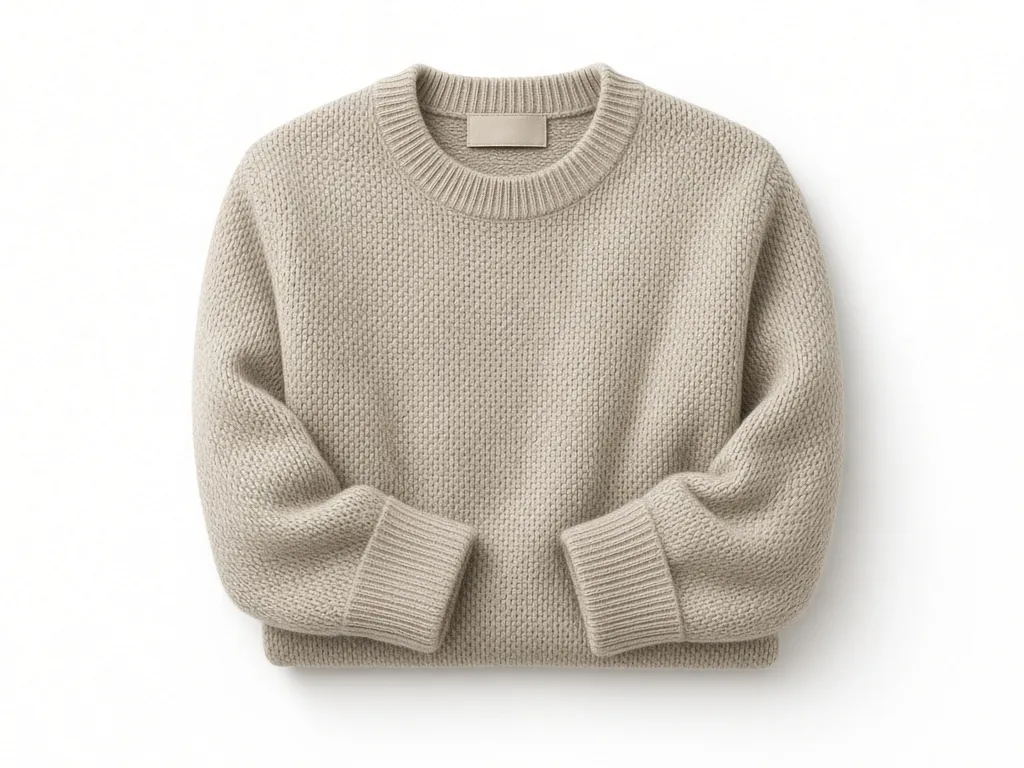
The name describes the result, not the equipment. A garment is dressed on a mannequin or model and photographed; in post-production the person or mannequin is removed and replaced with the garment's own interior — the back panel of the shirt appears where the mannequin's chest was. Done well, the viewer sees a shirt with volume, a natural collar, and a neck label floating in place: worn, but by nobody.
Three names for the same thing: ghost mannequin (Western e-commerce), invisible mannequin, and hollow man or 3D hollow man (common in Asian marketplace workflows). Fashion marketplaces and apparel brands use it because a consistent ghost set makes a 40-SKU catalog read like a system, not forty photo sessions.
Why Apparel Listings Prefer the Invisible Mannequin
Against the two obvious alternatives, the invisible mannequin wins on catalog economics:
- Live models introduce scheduling cost, sizing limits (one model can't wear every sample), and consistency drift — lighting and pose change between sessions, and shoppers notice when product pages look stitched together.
- Flat-lay shots are cheap but hide drape, collar structure, and true silhouette — the three things apparel buyers check first.
- Ghost mannequin keeps a garment's 3D structure with none of the human variables, and the same mannequin frames every SKU identically.
Marketplace style guides that demand a pure product focus (no faces, no heavy styling) also nudge listings toward the hollow man: it is the most "product-only" way to show worn shape.
The Traditional Studio Workflow
A studio ghost mannequin session per garment runs roughly like this:
| Step | What happens | Cost driver |
|---|---|---|
| 1. Dress | Garment steamed, pinned, dressed on mannequin | Prep time per SKU |
| 2. Shoot fronts | Front, back, detail crops on mannequin | Frames per SKU |
| 3. Shoot interior | Extra shots of neck label and inner lining | Often forgotten, re-shoots |
| 4. Neck-joint retouch | Remove mannequin, composite interior into silhouette | Skilled retoucher, 15–45 min/SKU |
| 5. Cleanup | Wrinkle softening, color match, background pass | Per-image finishing |
The retouching step is why ghost mannequin photography quotes run higher than standard product shots — you are paying for compositing labor, not just shutter time. Catalogs that skip the interior shot end up with the "floating collar" look that reads as low-effort on a product page.
Neck-Joint Retouching: The Expensive Part
The neck joint is where ghost mannequin images succeed or fail. The retoucher must rebuild the inner collar, place the label naturally, keep shoulder seams symmetric, and preserve the fabric's fall — all while removing every trace of the mannequin's plastic edges. Poor neck joints are the most common defect buyers subconsciously register as "cheap listing."
A workable manual order: mask the mannequin out of the front shot, warp the interior neck shot into the collar opening, align shoulder seams to within a few pixels, then match grain and shadow direction across the composite. Apparel retouchers get fast at this; everyone else pays them by the image.
The AI Workflow: From Flat Shot to Ghost Mannequin
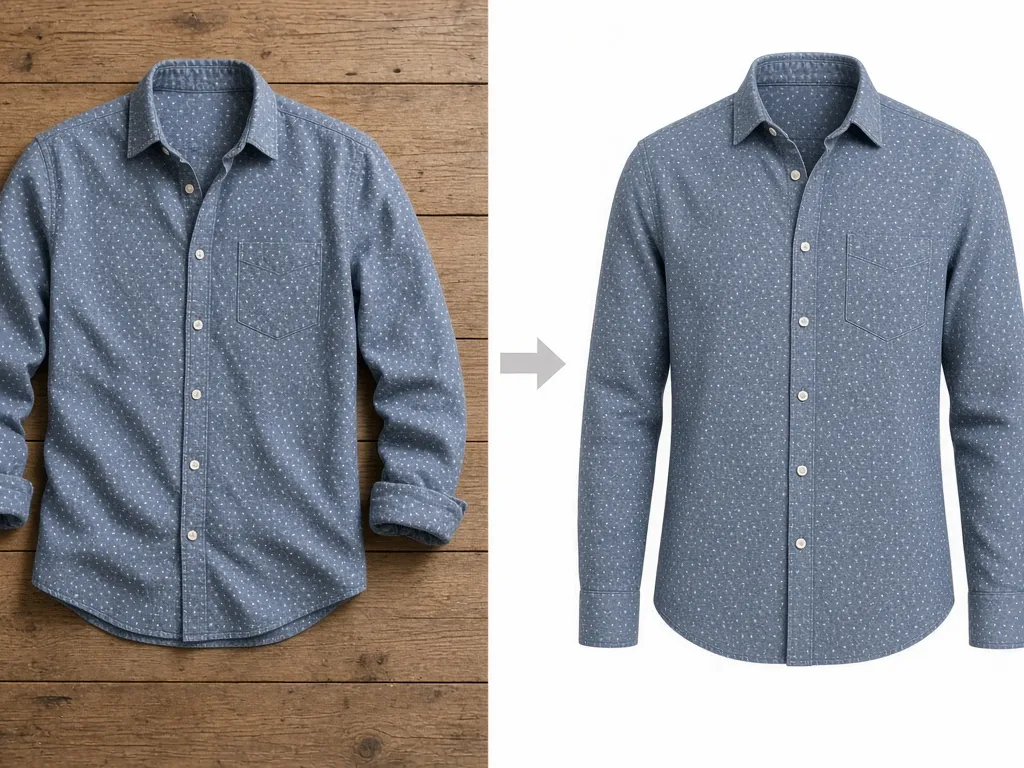
AI image generation changed the input requirements. Instead of a studio session, the reference can be one reasonably clean photo of the garment — flat-lay or on a hanger — and the generation step adds the filled-out form:
1. Photograph the garment once: flat-lay or hanger, even light,
   true color, whole garment in frame
2. Generate the ghost mannequin view from that reference:
   - garment locked to the reference photo (same fabric, color, print)
   - filled-out 3D torso shape, natural shoulder and collar fall
   - hollow interior with neck label visible
   - pure white background, no mannequin, no model, no text
3. Batch the remaining angles (back view, detail crops)
4. QC against the checklist below, export square 2000px
The garment-lock part matters: generation that ignores the reference produces a generic shirt, and a catalog of generic shirts defeats the purpose. The E-commerce Studio runs this as one flow — upload the garment photo, pick the apparel card set, and export the ghost view alongside white-background and lifestyle cards. Try the E-commerce Studio →
Quality Checklist for Ghost Mannequin Images
Run every image through these before it reaches a listing:
- [ ] Collar and neck label visible and believable
- [ ] Shoulder seams symmetric left-to-right
- [ ] Sleeve drape matches the garment's real fabric weight
- [ ] No mannequin edges, pins, or plastic reflections
- [ ] White background at RGB 255,255,255 where the marketplace requires it
- [ ] Consistent framing across all SKUs in the catalog
- [ ] Color accurate to the physical garment — check against the reference photo
Consistency: The Real Reason to Systematize
One strong ghost mannequin image does little; a catalog of them compounds. When every SKU shares framing, lighting, and background, category pages look like a brand, cross-sell rows look deliberate, and the small perceived-quality lift applies to hundreds of listings at once. That is also the argument for generating from references rather than re-shooting: the pipeline holds the framing constant while the garments change.
Frequently Asked Questions
What is a ghost mannequin photo?
A garment image where the mannequin (or model) has been retouched out, leaving a worn, filled-out shape with the interior — usually the neck label — visible. Also called invisible mannequin or hollow man.
How much does ghost mannequin photography cost?
Studio pricing typically combines a per-shot fee with per-image neck-joint retouching; retouching is usually the larger half. AI workflows compress both into a generation step from a single reference photo.
Can I create ghost mannequin images without a mannequin?
Yes — AI generation from a flat-lay or hanger photo can synthesize the filled-out form directly, keeping the garment locked to your reference photo.
Do marketplaces accept ghost mannequin images?
Ghost mannequin shots are standard and accepted on major apparel marketplaces; some marketplaces prefer them over model shots for the main image because they keep the listing product-focused. Check each category's style guide for collar and label requirements.
How many views does an apparel listing need?
Front, back, and one detail crop at minimum; strong listings add side, fabric macro, and size-context images — seven to nine total on platforms that allow it.
Sources
- Marketplace apparel style guidance (Amazon Seller Central image requirements, G1881 family)
- eBay picture policy — no added graphics, accurate representation (ebay.com/help/policies/picture-policy)
- GLMImage E-commerce Studio apparel workflow documentation
Next: the companion technique — white-background product photos that pass Amazon's main-image audit →







