
<!--heroUrl https://img.glmimage.app/uploads/blog/ecommerce-requirements-hero-1789654534767.webp-->
A white background product photo is the entry ticket to most marketplaces: Amazon requires it on the main image, Walmart and Rakuten follow the same instinct, and even platforms that don't mandate it reward the clean, catalog-consistent look. The spec is stricter than "looks white" — Amazon's main image needs a pure white background at RGB 255,255,255 with the product filling at least 85% of the frame. This guide covers why the rule exists, how to hit true white in camera, how to fix near-misses in post, and the AI workflow that turns any clean product photo into an Amazon-ready white-background master.
Key Takeaways
- Amazon main image: pure white background (RGB 255,255,255), product ≥85% of frame, no text or props.
- "White paper" is not white — an unlit background sweep photographs light grey, and the audit reads pixel values, not perception.
- In-camera route: light the background 1–1.5 stops hotter than the product so the backdrop clips to 255.
- Post route: background removal + white fill works when edges are clean; hair/fur/glass need care.
- AI route: generate the white-background master from one product photo, product locked to the reference — no studio, no sweep, no retouching queue.
- Export square, ≥1000px longest side for zoom (2000px masters future-proof every marketplace).
Why Marketplaces Want Pure White Main Images
The pure-white main image is a search-results decision, not an aesthetic one. In a grid of thumbnails, a true-white background makes product silhouettes pop and keeps the results page visually uniform. Amazon enforces it because a mixed-background grid looks broken — and because pure white is the one background every seller can produce, leveling the field between studio budgets.
The rule has teeth: listings with off-white, gradient, or lifestyle main images can be suppressed from search or lose the buy box, usually without a specific warning — the listing just stops performing. If your traffic dies overnight, the main image background is one of the first things to audit.
What "Pure White" Actually Means

Pure white means the background pixels read 255, 255, 255 — not 250, not "white-ish", not a soft gradient. Camera meters are the enemy: point any auto-exposure at a white sweep and it will render it light grey to protect highlights. That half-stop of grey is invisible to your eye on a bright monitor and glaring next to other listings on a marketplace grid.
Quick check in any editor: sample the background corner with the color picker. If it reads below ~254 in any channel, the image fails the spirit of the rule even if it survives upload.
Lighting a True-White Set In Camera
The classic setup clips the background to white at capture:
- Two background lights aimed at the sweep, each 1–1.5 stops hotter than the key light on the product
- Product pulled 1.5–2m forward of the sweep so the background light wraps behind, not onto, the product
- White paper or vinyl sweep, clean and uncreased — grey sweeps never fully recover
- Expose for the product; let the background blow out
The failure modes are predictable: grey corners (background lights too narrow), flare haze on product edges (product too close to the sweep), and reflected white on glossy products (angle the lights or flag them).
The Background-Removal Route
When the shot exists but the background doesn't read 255, removal tools finish the job: cut the product out, place it on a generated white layer, then rebuild contact shadows. This is fast for hard-edged products and slow for the classic edge cases:
| Product type | Difficulty | The problem |
|---|---|---|
| Boxes, bottles, phones | Easy | Clean silhouette, few holes |
| Garments with folds | Medium | Soft internal edges near white fabric |
| Glass and transparent items | Hard | See-through regions read as background |
| Hair, fur, plants | Hard | Strand-level edges |
| Chrome and mirrors | Hardest | The background lives IN the product |
Contact shadows are the step everyone skips and every buyer notices: a product floating on featureless white looks fake. A soft elliptical shadow under the base, matching the key light direction, restores grounding.
The AI Workflow: Any Photo to White-Bottom Master
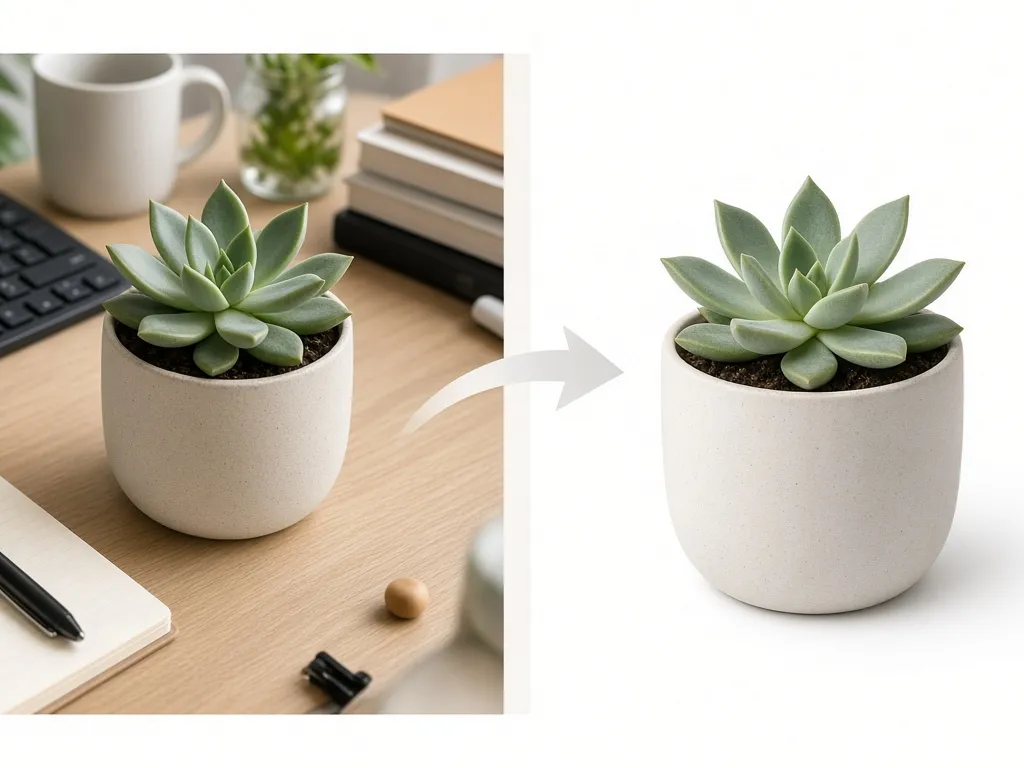
The newest route skips the studio entirely. One reasonably clean photo of the product — phone shot on a desk is enough — becomes the reference, and generation produces the marketplace-ready master:
WHITE-BACKGROUND MASTER, marketplace-compliant:
- product locked to reference photo: same item, color, material,
  wear state, orientation
- pure white background RGB 255,255,255, no gradient
- product fills 85–90% of frame, fully in shot
- soft contact shadow under the base, consistent with light
- no text, no props, no reflections of props
- square 1:1, export ≥2000px

DETAIL VARIANTS (same lock):
- macro crop on texture/material
- 3/4 angle if reference is straight-on
Garment-lock and product-lock rules matter here more than anywhere: the listing must show the actual SKU, so generation follows the reference photo rather than inventing a cleaner version of the product. The E-commerce Studio → runs this as its white-background card — upload, generate, export the set with marketplace presets applied.
Export Settings That Survive Upload
- [ ] JPEG quality 80–90 (or PNG), sRGB profile
- [ ] Square master, 2000×2000px
- [ ] Background sampled at 255,255,255 in all corners
- [ ] Product fill ≥85%, nothing cropped at frame edge
- [ ] Filename ASCII, no spaces
- [ ] Version for zoom enabled: longest side ≥1000px (yours is 2000 — done)
Common Failures and Fixes
- Grey background after upload. Marketplace recompression can pull near-white down; start from true 255 with headroom.
- Product edge halo. Removal tools leave a 1px white fringe — contract the mask 1–2px or regenerate.
- Floating product. No contact shadow reads as fake; add the elliptical ground shadow.
- Zoom inactive. Export long side ≥1000px; check the platform didn't downscale on upload.
- Color drift vs the physical product. Calibrate against the reference photo before publishing — returns start with color surprises.
Frequently Asked Questions
Does Amazon require white backgrounds on all images?
Only the main image. Additional images can be lifestyle, detail, or infographic styles — text is allowed there but not on the MAIN.
Can I just remove the background instead of shooting white?
Yes — removal works well for hard-edged products. Watch edge halos and rebuild the contact shadow; transparent and reflective items still benefit from a proper white set or an AI pass that keeps the product locked.
What size should a white-background product photo be?
Square, at least 1000px on the longest side for zoom to activate; 2000px masters cover every current marketplace requirement.
Is a phone photo good enough as the AI reference?
Yes, if it's sharp, evenly lit, true-to-color, and shows the whole product. The generation step handles the background and framing; the reference only has to faithfully show the SKU.
Do I need contact shadows on a white background?
A soft ground shadow keeps the product from floating. Keep it subtle and aligned with the lighting — heavy drop shadows look like 2009 clip-art.
Sources
- Amazon Seller Central — main image requirements (sellercentral.amazon.com/help/hub/reference/G1881)
- Walmart Marketplace image guidelines (marketplacelearn.walmart.com)
- eBay picture policy (ebay.com/help/policies/picture-policy)
- GLMImage E-commerce Studio white-background card documentation
Related: the full platform spec breakdown in Amazon product image requirements: eBay, Walmart & Rakuten →, and for apparel sellers, ghost mannequin photography with AI →.








